AI Direction
The Design System That Uses Itself
The promise at stake: adoption — the gap between "we have a design system" and "I know how to build my screen with it the right way."
Outcome recap
- A working proof that adoption — the hardest design-system problem — can be attacked from a new angle
- One closed loop: build, self-check, and self-improve, instead of three separate tools
- Accessibility scanning and prototype-building share the same machinery
The challenge
The hardest problem in a design system isn't building it. It's adoption. A system only returns its investment when product teams reach for it by default and apply it correctly — and the gap between "we have a design system" and "I know how to build my screen with it the right way" is where most of that investment quietly leaks away. Adoption work is unglamorous and chronically under-resourced; it rarely gets its own budget line. Meanwhile, every team that reinvents a component or misapplies a token erodes, screen by screen, the exact consistency the system exists to guarantee.
The conventional answer is more governance — police usage, review everything. That doesn't scale, and it breeds friction with the very teams you need on your side. Fighting adoption with enforcement just turns the design system into the thing product teams route around.
What I did
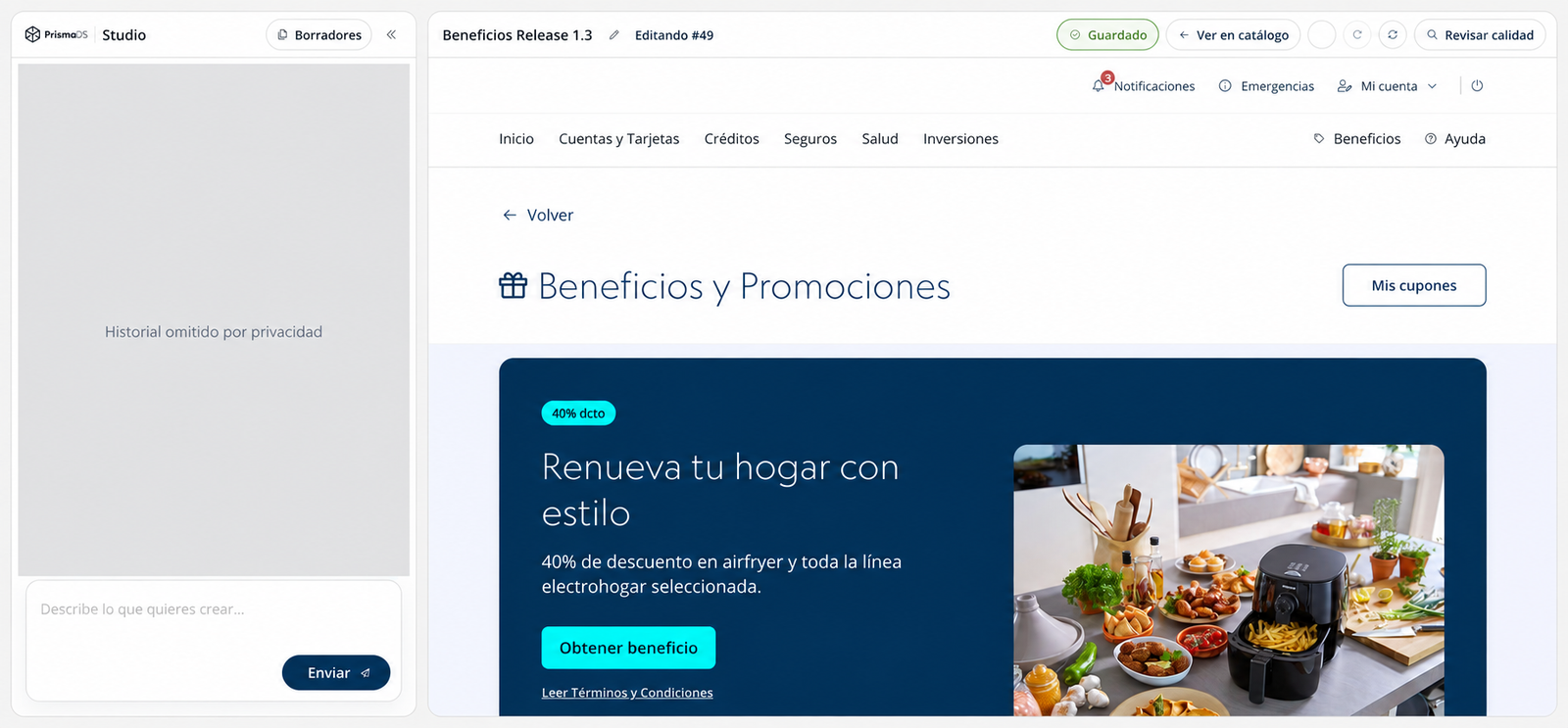
I wanted to invert the problem: instead of forcing adoption, make building it right the path of least resistance. That reframe was the idea, and I made the bet on my own initiative, rather than waiting for the adoption problem to get funded: an AI agent that prototypes faithfully to the system. You describe a screen in plain language; it produces a working, on-brand prototype built only from the real components and tokens. It's on-brand by construction, not by approximation, because it consumes the live design system the same way a real product team would.
The design decision that made it more than a demo was to make it a closed loop, not a one-shot generator: the agent builds from the system's real components and tokens, then checks its own work — screenshotting itself, reviewing against layout and brand rules, and running an automated accessibility scan before it's allowed to call anything "done" — and every correction persists, so it gets more accurate with use instead of repeating the same mistakes.
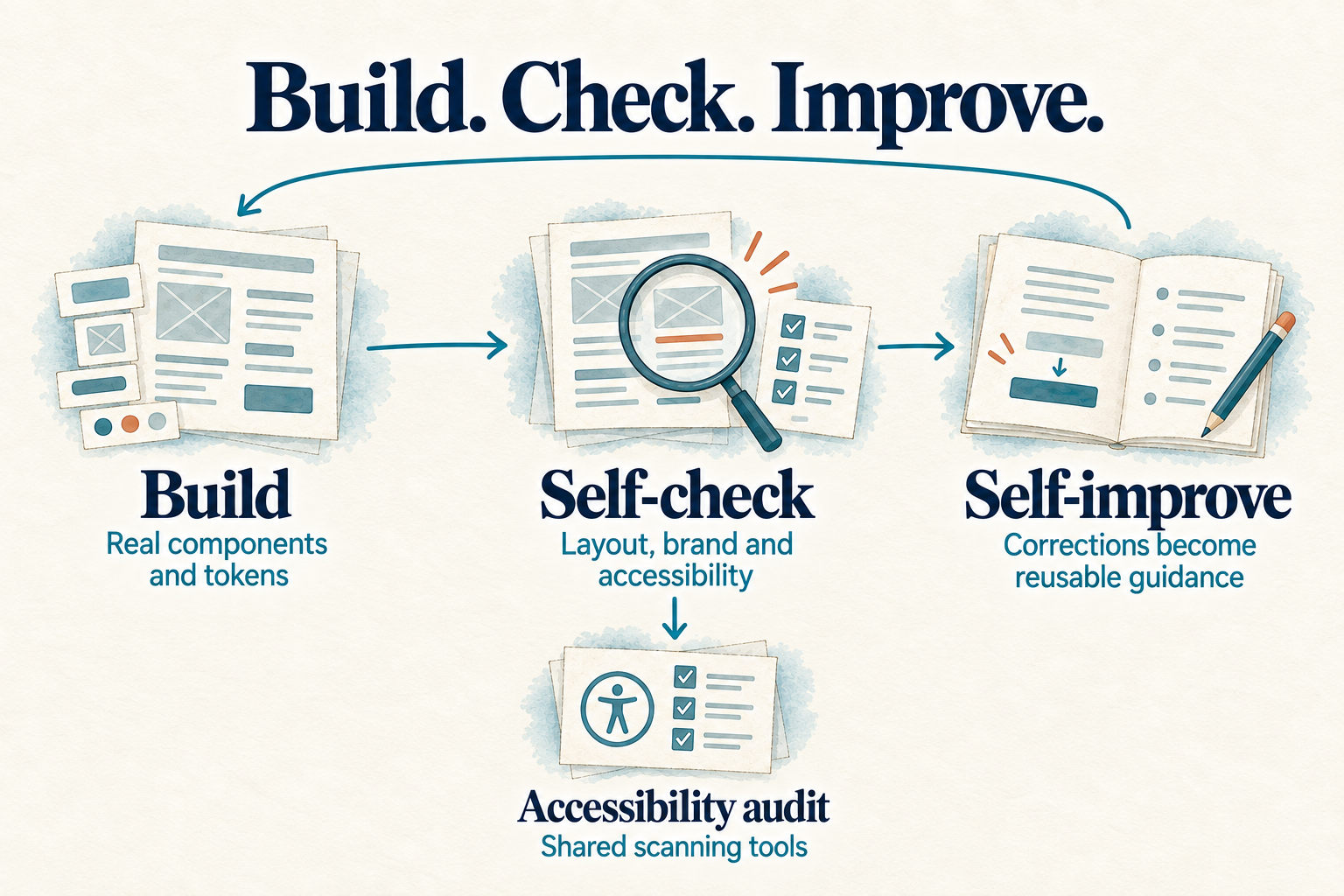
Getting to a trustworthy self-check was the hard part, and it didn't work on the first pass. AI output is plausible-but-wrong by default — a prototype can look right at a glance and still misuse a component or fail contrast — so the self-check had to be strict enough to catch that, not just decorative. Making the agent actually look at what it built, against real rules, before declaring victory, is what turned a fast demo generator into something I could trust with real work.
The kicker: build and audit are one capability. The same accessibility scanning baked into the "done" check is the machinery that produced my WCAG accessibility report. "Build it right" and "prove it's right" aren't two tools; they're one loop. Every prototype the system generates is also a probe of what the design system gets wrong.
I used it as a real working tool, not a demo prop — for example, to turn an ambiguous product spec into a clickable, state-by-state prototype that an internal product team could react to, moving a conversation from a document full of "TBD" to something tangible they could click.
Outcome & impact
A working proof that the hardest design-system problem — adoption — can be attacked from a new angle: make the correct path the easy path instead of policing the wrong ones. Production-looking prototypes from plain-language prompts, on-brand by construction and accessible by default, with one loop that both accelerates building and enforces quality — so velocity and rigor stop being a trade-off.
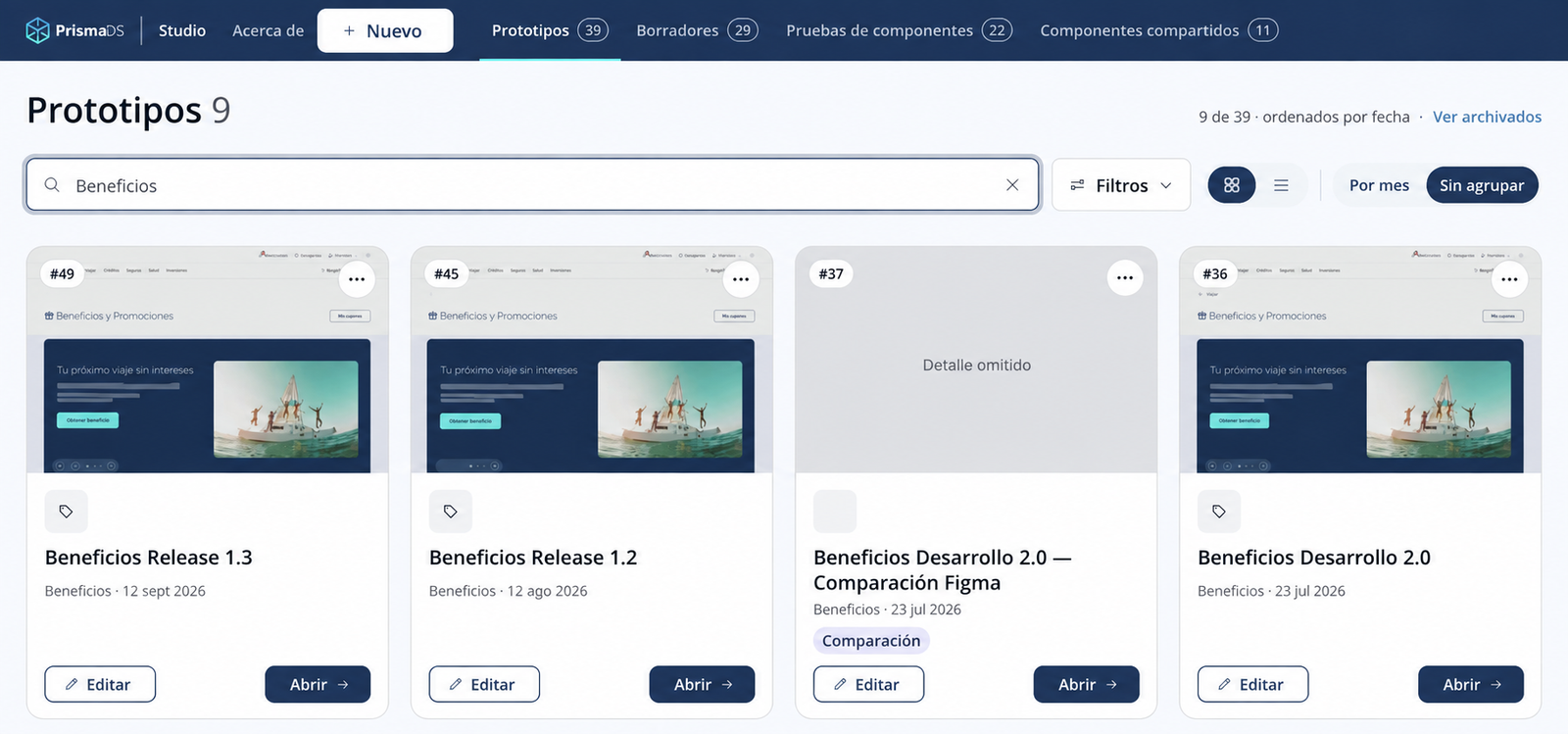
What compounds is the knowledge underneath it: a self-improving base about the system that gets more useful with every use, and is positioned to feed future AI tooling. Taken together, it's a demonstration of AI fluency at the leadership altitude — directing agentic AI toward a strategic problem, defining the quality bar, and judging the output — the opposite of an engineer hunting for a use case. It's already shaping how the team thinks about where the design system goes next.
What this taught me
The lesson wasn't the AI — it was the discipline of not trusting it. Plausible-but-wrong is the default failure mode of anything generative, and the only real defense is building the judgment in as a gate, not a hope. That's a leadership call as much as a technical one: deciding where the bar is, and refusing to ship until the system meets it itself. This was a self-initiated bet with no team behind it yet — which means the credit here is narrower and more personal: it's proof of what I choose to build when nobody's asked me to, and the same standard I'd expect from anyone I directed to do it.
"Plausible-but-wrong is the default failure mode of anything generative, and the only real defense is building the judgment in as a gate."
Skills demonstrated
- Design-system strategy
- Adoption and DesignOps thinking
- Agentic AI direction
- Prompt-to-prototype system design
- Quality-harness and self-verification design
- Accessibility automation
- Knowledge-substrate (registry) design
- Product prototyping
- Technical judgment at leadership altitude
Proof / artifacts
The combined build-check-improve infographic, editing cockpit, and prototype catalogue are shown above, in context.